
Rolling Forecast: How to Build a 12-Month Plan
Published by MyBreakeven. Editorial standards and corrections. Report a calculation or content issue to support@mybreakeven.com.
Build a rolling forecast with dated monthly assumptions, a worked service-business example and a free Excel template. Keep forecasts separate from the budget.
What is a rolling forecast?
A rolling forecast updates future assumptions and adds a new end period after a period closes. A rolling 12-month forecast after March covers April through the following March. Keep the original budget and archived prior forecasts for comparison.
Download the rolling forecast Excel workbook or inspect the worked example.
A rolling forecast maintains a forward planning window as time passes. After a month closes, record its actual results, update the remaining assumptions and add a new future month. A 12-month horizon therefore stays 12 months long instead of shrinking toward December.
Its practical value is a current view of what the business expects next. Keep the approved budget available for accountability and preserve earlier forecast versions for learning. Rewriting an old forecast after seeing the actual result removes the evidence needed to improve forecast accuracy.
Download a dated rolling forecast template
Download the rolling forecast Excel workbook
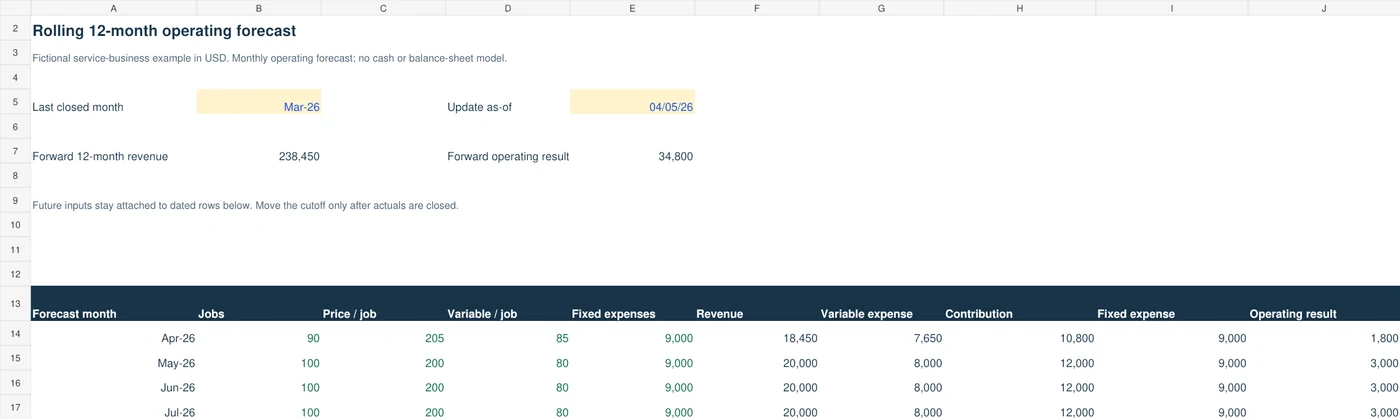
The editable XLSX contains one operating forecast and a dated input schedule. It forecasts completed jobs, net price, variable cost and fixed operating expenses for the 12 months after the last closed month. A fictional service example is included. It does not model receivables, tax, debt, inventory, cash balances or a full three-statement forecast.
Rolling forecast versus annual budget and flexible budget
| Method | Question | What changes |
|---|---|---|
| Original annual budget | What did we approve before the year? | Keep the approved version for comparison. |
| Rolling forecast | What do we now expect over the next fixed-length window? | Update future assumptions and add the new end month. |
| Flexible budget | What would original rates imply at actual activity? | Use actual activity with original budget rates. |
For example, a January–December annual budget still measures that calendar year in September. A rolling 12-month forecast prepared after September closes normally covers October through the following September. A latest estimate for January–December, containing nine months of actuals and three months of forecast, is a useful annual view, but its future window is only three months.
Compare recorded results with the original plan in the budget vs actual Excel template. Investigate activity and same-activity performance in the flexible budget guide. Neither comparison is replaced by a fresh forecast.
Worked example: refresh the forecast after March
Assume a fictional service firm originally expects 100 comparable jobs each month at $200 net revenue per completed job. Variable operating inputs are $80 per job and fixed operating expenses are $9,000 per month. The example excludes interest, tax, depreciation and owner distributions. Any owner salary included in actual operations must appear once in the relevant expense boundary.
Under those assumptions, monthly revenue is $20,000, variable expense is $8,000 and contribution is $12,000. Operating result is $3,000. Twelve identical months would produce $240,000 revenue and $36,000 operating result; a flat pattern is an illustration rather than evidence that demand or seasonality will behave that way.
March closes at $18,000 revenue and $17,000 included operating expenses, giving $1,000 operating result. Review the completed jobs, realized prices and invoices before changing expectations. For April, management now assumes 90 jobs at $205, with $85 variable cost per job and the same $9,000 fixed commitment. May through the following March remain at the original monthly assumptions in this miniature example.
| Line | Original April | Updated April | Difference |
|---|---|---|---|
| Completed jobs | 100 | 90 | −10 jobs |
| Net price / job | 200 | 205 | +5 |
| Variable cost / job | 80 | 85 | +5 |
| Revenue | 20,000 | 18,450 | −1,550 |
| Variable expense | 8,000 | 7,650 | −350 |
| Contribution | 12,000 | 10,800 | −1,200 |
| Fixed operating expense | 9,000 | 9,000 | 0 |
| Operating result | 3,000 | 1,800 | −1,200 |
The calculation is 90 × $205 = $18,450 revenue; 90 × $85 = $7,650 variable expense; $18,450 − $7,650 − $9,000 = $1,800 operating result. Lower total variable expense accompanies fewer jobs, even though variable cost per job increases. Treating the $350 total reduction as demonstrated efficiency would miss that change.
Explain the $1,200 change with the actual drivers
Start from the original $3,000 operating result. Ten fewer jobs at the original $120 contribution per job reduce the result by $1,200. The $5 price increase across 90 forecast jobs adds $450. The $5 increase in variable cost across those same 90 jobs subtracts $450. Fixed expenses do not change. The bridge is $3,000 − $1,200 + $450 − $450 = $1,800. This ordering keeps the effects additive and uses forecast volume for the two rate changes.
That bridge explains a change between two forecast assumptions. It is not a realized price or efficiency variance and should not be presented as a customer outcome. Record the evidence behind each revised driver before deciding that its new value is more reliable.
With April at $1,800 and the next eleven months at $3,000, the forward 12-month operating result is $34,800. Forward revenue is $238,450. The $1,200 reduction from the prior flat expectation belongs to the April assumption changes. March actual result stays in the dated history and is not added to this April–March future total.
How to build and refresh a rolling forecast
- Define the decision and horizon. Choose the months needed for staffing, pricing or funding decisions. This file uses monthly operating results over 12 future months.
- Close the period. Reconcile actuals to the same expense and revenue definitions used in the model. Keep actuals in dated rows.
- Archive the previous version. Save its as-of date, assumptions and expected result before changing anything.
- Review the drivers. Update completed jobs, net price, variable cost and fixed commitments with operational evidence. Do not apply the same growth rate to every row without justification.
- Advance the cutoff. Change Last closed month to a date within the month just closed. The next 12 calendar months become the forward window.
- Add the new end-month inputs. Match each driver row to its absolute month. Review all months still in the window, including renewals and seasonal changes.
- Check constraints. Compare required worker-hours with realistic capacity, and separately check sales demand and collection timing.
- Record the reason and action. Explain material changes with an owner, evidence and review date. Decide whether to adjust price, scheduling, commitments or cash plans.
Using this workbook without losing date alignment
The dated schedule initially covers January 2026 through June 2027. Future assumptions are editable yellow cells. Historical actual revenue and expenses occupy separate columns in the same dated schedule. Forecast output retrieves a driver's row by matching its month, so advancing the cutoff from March to April makes the output begin in May and preserves April's drivers in April's input row.
The example's last closed month is March 2026. Its update date is an editable example date, not the file's publication date. Adapt the schedule dates and as-of date to your own reporting cycle before using it. The template does not automatically copy forecast values into actuals or declare a period closed.
Before the window extends beyond June 2027, add the necessary dated input rows and extend the formulas' referenced ranges. Otherwise the report explicitly returns Missing / duplicate month or Incomplete. Changing only the visible dates does not supply new drivers. Keep each month unique and enter all four driver fields, including explicit zero where it is a valid assumption.
In the dated input schedule, store each month as its first calendar day, such as April 1, 2026. Apply a month display format rather than typing a text label such as “Apr-26.” The cutoff accepts a spreadsheet date within the last closed month. A text or missing cutoff leaves the forecast incomplete. A duplicated month is also incomplete: the model must not silently choose one of two competing driver rows.
These files use common spreadsheet formulas, but native Microsoft Excel and Google Sheets behavior has not been independently certified. Check April revenue of $18,450, April operating result of $1,800 and the forward result of $34,800 after opening or importing the example. Archive a copy before testing a later cutoff.
What changes in a quarterly rolling forecast?
A four-quarter forecast drops the closed quarter and adds a new quarter at the far end. A monthly model can still support a quarterly management review: group three correctly dated months into each quarter and refresh their drivers together. This workbook presents monthly results; it does not include an automatic quarterly output.
Define whether the horizon means four future quarters or the current partly completed quarter plus future quarters. Those boundaries produce different windows. For a seasonal business, retain month-level assumptions even when the board receives quarterly totals, because three equal months may hide a concentrated payroll or demand pattern.
Benefits, workload and limits
A regularly refreshed view can expose a future shortfall earlier, connect hiring to expected work and keep planning relevant across a year-end. Those benefits depend on disciplined source data and useful assumptions. Updating a spreadsheet more often does not independently make uncertain customer demand accurate.
Use a manageable set of drivers and assign an owner to each material assumption. Frequent refreshes create work, and constant revisions can blur performance accountability if budgets and forecasts are mixed. Preserve the budget, explain changes and review prior forecast errors at the same lead time rather than selecting whichever version looks best after the fact.
For the service example, 90 jobs at two delivery hours require 180 hours. If practical delivery capacity is 160 hours, the forecast needs a feasible staffing, scheduling or scope change. Expected revenue is also different from cash collected. Translate collection delays and supplier-payment dates into the 13-week cash-flow forecast before treating operating profit as available bank cash.
A short monthly forecast review
Ask four questions: What actually closed? Which future assumption changed? Which constraint or cash date matters? What decision follows? Keep the reconciliation and next action beside the model. A forecast that shows a gap but assigns no response is an incomplete planning process.
For error review, compare an archived one-month-ahead forecast with the matching month's actual result. Record amount differences and the drivers behind them. Avoid percentage accuracy measures with zero actuals unless you define a suitable alternative; do not quietly count an unavailable percentage as perfect accuracy.
Method and further reading
The workbook, service assumptions, calculation bridge and workflow are original MyBreakeven examples. ACCA's rolling-budget discussion supports the fixed-horizon distinction and describes the extra maintenance involved. OpenStax explains the different purpose of a flexible budget. For a wider set of connected schedules, see our master budget example.
Frequently asked questions
Does a rolling forecast replace the annual budget?
It can be used alongside the approved annual budget. The budget preserves the agreed target; the rolling forecast records current future expectations.
How often should I update it?
Use a cadence that matches the decision and data quality. This example refreshes monthly after the actual period closes. A quarterly review may be sufficient for a different business.
Is this a rolling cash-flow forecast?
This template forecasts operating revenue and included expenses. It does not model collection dates, financing or closing cash. Use a dated cash-flow schedule for those tasks.
Can I change the dates for a new year?
Update the absolute dated input schedule and its referenced ranges, then set the last closed month. Do not move date headings over unchanged input positions.
Browse the MyBreakeven blog hub for related planning guides.
Planning estimates only—not accounting, tax, legal or lending advice.