
Budget vs Actual Excel Template: Monthly and YTD
Published
Published by MyBreakeven. Editorial standards and corrections.
A budget vs actual Excel template compares the budget you approved before a period with the results recorded for that same period. Use the free workbook below to review one month or January through a selected month. It includes an empty report for your figures and a separate completed fictional example.
The report answers “How far did we finish from the original plan?” It does not, by itself, tell you whether a difference came from activity, price, resource use or accounting timing. Keep those questions separate before deciding what to change.
Download the budget vs actual Excel workbook
XLSX, no macros, no account required. Two worksheets: Blank report and Filled example. This is a focused operating-result report with net revenue and included expense totals, rather than a general-ledger import or a full financial-statement model.
What the workbook calculates
Choose a calendar month from 1 to 12. The top report retrieves that month's budget and actual totals. A second report adds the months from January through your selection, so the budget and actual periods match. Calculated results stay unavailable until all required fields in the selected comparison are numeric.
| Field | What you enter or receive |
|---|---|
| Original budget | Approved monthly net revenue and included expense totals. Keep this baseline unchanged during reviews. |
| Actuals | Comparable recorded net revenue and expenses after each month closes. Both fields are needed. |
| Operating result | Net revenue less the expenses included in this report. It is not automatically after-tax net income. |
| Raw variance | Actual minus budget, using the same sign convention for every line. |
| Percentage variance | Raw variance divided by the absolute budget value. A zero budget displays n.a. |
| Direction | Higher revenue or operating result is favorable; higher included expense is unfavorable. These labels describe this comparison. |
| Completeness | Budget entries / 2 and Actual entries / 2 show whether both fields for a month are numeric. |
Budget vs actual example: a $3,000 operating shortfall
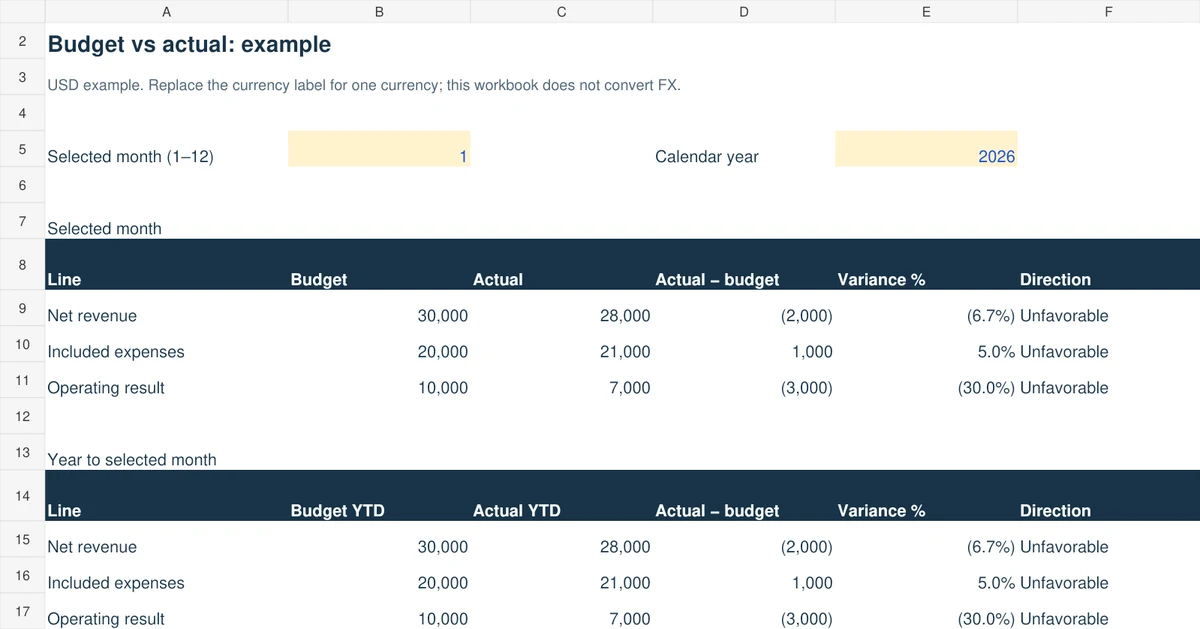
A fictional service company budgets $30,000 revenue and $20,000 included operating expenses for January. Its budgeted operating result is $10,000. Recorded revenue is $28,000 and expenses are $21,000, leaving $7,000. All figures use the same January accounting basis and USD currency.
| Line | Budget | Actual | Actual − budget | Interpretation |
|---|---|---|---|---|
| Net revenue | 30,000 | 28,000 | −2,000 | 6.7% below budget; unfavorable |
| Included expenses | 20,000 | 21,000 | +1,000 | 5.0% above budget; unfavorable |
| Operating result | 10,000 | 7,000 | −3,000 | 30.0% below budget; unfavorable |
The result bridge is −$2,000 revenue variance minus the +$1,000 expense variance, giving −$3,000. Adding the expense overrun to profit would reverse its effect. The expense percentage and the operating-result percentage use different denominators, so their percentages cannot be added.
Separate the amount difference from percentage-point changes. January's operating margin is $7,000 ÷ $28,000 = 25%, compared with $10,000 ÷ $30,000 = 33.3% in the budget. That is an 8.3 percentage-point margin decrease. It is a different measure from the 30% decrease in operating-result dollars.
The sample continues with February revenue of $32,000 and expenses of $20,000, followed by March revenue of $30,000 and expenses of $20,500. Selecting month 3 produces $90,000 budget revenue and $60,000 budget expenses against $90,000 actual revenue and $61,500 actual expenses. YTD operating result is $28,500 versus $30,000: a $1,500 unfavorable difference. April actuals stay blank, so selecting April does not falsely treat an unclosed month as zero.
How to use the template each month
- Save the original. Keep an untouched downloaded copy. Work on Blank report; retain Filled example for reference.
- Set the calendar year and reporting month. This version uses January–December. A fiscal year beginning in another month needs a revised period mapping; changing the year alone does not create one.
- Enter approved budget totals. Use the yellow revenue and expense input cells for each month. Do not revise them merely to remove an unfavorable result.
- Close the actual period. Reconcile accounting records, credits and adjustments. Enter both actual fields for every closed month. An explicit zero records a real zero; a blank means unreported.
- Inspect month and YTD together. Check completeness counts before interpreting a result. YTD does not skip a missing month and call the remaining total complete.
- Record a reason and action. Use the monthly notes column for the main cause, evidence, owner and follow-up date. Keep a separate detailed account schedule if you need more categories.
- Archive the report. Save a dated copy after review. Changes to expectations belong in a rolling forecast, alongside the original budget.
Investigate a variance before judging performance
A lower expense total can follow fewer completed jobs. It can also reflect a supplier credit, an invoice recorded next month or a useful improvement. An “unfavorable” increase may support extra profitable activity. Read the sign first, then examine quantity, rates, mix and timing.
For example, suppose 100 jobs were planned and only 80 were completed. Lower variable spending than the original 100-job budget is expected. The static report still measures the original-plan difference; it does not establish efficiency. Use the flexible budget and variance calculator to compare actual results with original rates applied to actual activity.
Choose a consistent accounting basis. Under an accrual operating report, an unpaid customer invoice may be revenue while its collection happens later. Loan principal and equipment payments are not automatically operating expenses. For future payment dates and the minimum bank balance, use the 13-week cash-flow forecast. The master budget worked example shows how operating and cash schedules connect.
Zero budgets, losses, returns and missing figures
Zero budget: if $500 of actual expense appears against a zero budget, the amount variance is +$500 and is unfavorable under this report's convention. The percentage is unavailable. No percentage should be invented by dividing by zero.
Budgeted losses: the denominator is ABS(budget). A −$2,000 budget result and −$1,000 actual result give a +$1,000 favorable difference and a +50% variance under that stated convention. This is improvement from a planned loss, not a 50% operating margin.
Returns and credits: enter revenue after the returns included in your chosen accounting basis. Supplier credits reduce the related expense total. Do not subtract the same refund in net revenue and again as an overlapping expense allowance. Keep positive spending totals consistent; do not type ordinary expenses as negatives because the result formula subtracts expenses.
Missing fields: do not put a dash or the word “zero” in a numeric cell. Enter 0 when the account genuinely has no activity. Leave an unknown actual blank. If a report says Unreported, inspect the entry counts and selected month before replacing formulas.
Reporting controls: enter a numeric whole month from 1 through 12 and a whole calendar year from 1900 through 9999. Invalid controls leave the report unavailable. A zero-activity month still needs explicit zeros in both actual input cells; a partial entry is not a completed close.
Questions about the Excel report
Can I use this as a budget vs actual dashboard?
The top month and YTD tables provide a compact review. This version does not import account records, show category-level charts or provide automatic bookkeeping integration.
Does it update the budget to actual activity?
No. The original budget remains the benchmark. The separate flexible-budget guide owns activity-adjusted comparisons.
Can I open it in Google Sheets?
The download is an XLSX workbook using common formulas. Native Excel and Google Sheets behavior has not been independently certified. After import, check the January result of $7,000 and March YTD result of $28,500 before relying on the imported version.
Can I add account categories?
Keep your category-level records in a supporting schedule and enter reconciled totals here. Inserting category rows into the report would require updating its formulas and completeness checks.
Method and related resources
The worked figures and workbook are original fictional MyBreakeven examples. For the underlying distinctions, see OpenStax on flexible budgets and evaluating budget differences. These references explain concepts; they do not certify this file.
Continue with the contribution income statement, restaurant budgeting guide or business planning resources.